Practical Binary Analysis Ch. 5 CTF: Lvl 6
This is my solution to capture the Level 6 flag in the Practical Binary Analysis CTF challenge. I had some trouble with this flag due to some technical issues with discrepancies between the code on the VM and the code archive on the website, which I will explain later.
Sixth Flag: lvl6
Running the lvl6 binary prints out a series of of prime numbers from 2 to 97

Strange, doesn’t appear to do anything else. Lets see if ltrace gives us something useful
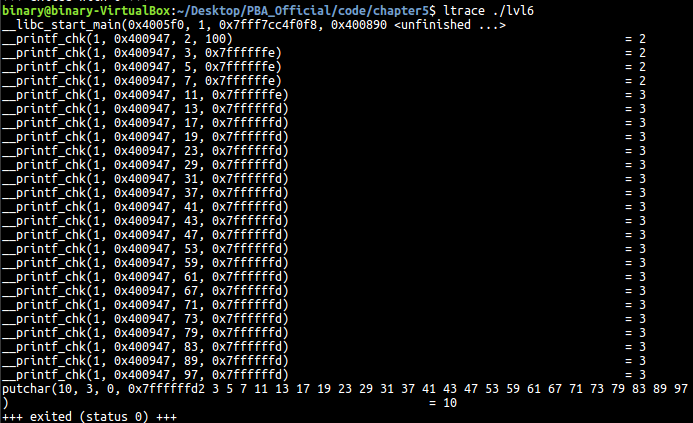
It seems these printf calls are merely calls for the sequence of numbers we see printed out on the screen, and there are no other interesting library calls here. Disappointing. Maybe if we check the strings within the binary we’ll find something interesting
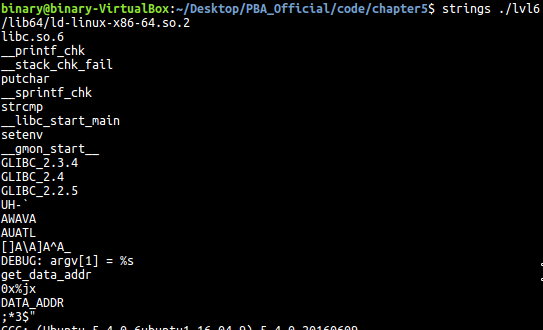
We see two strings that are interesting. One appears to reference a command line argument and also get_data_addr. We’ve seen this exact layout before in the initial lvl1 flag, so why not try passing get_data_addr as a command line argument and seeing if anything changes?
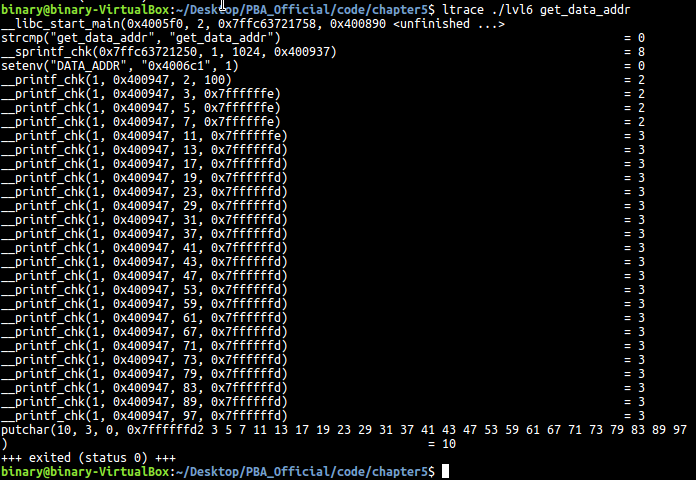
Looks like something did change. We now see that there was a strcmp that checks for the value of get_data_addr. Perhaps we would have noticed this if we passed in garbage data for the command line arg initially, but I guess we were lucky and skipped that step. We see that an environment variable DATA_ADDR is set to 0x4006c1. This definitely seems like its hinting to check a program address, so lets see where that takes us.

This appears to take us to an address within our executable .text, but if you analyze the instructions, they appear to be pretty obscure. The only instruction that seems to be recognizable is the lea instruction. Coincidentally, there are exactly 16 bytes, or 32 nybbles, between the start of the DATA_ADDR address and that lea instruction, which is the exact length we need for our flag. It seems the hint was suggesting that there was data mixed in with instructions in the .text section. Lets concatenate the bytes in order and pass them to the oracle and see if we have captured the correct flag.

Huh? I’m sure I used the correct sequence,
It appears the oracle binary pre-installed on the VM under /home/binary/code/chapter5 had a bug in it somewhere that doesn’t accept the correct flag. Perhaps it is an earlier version of the binary that they forgot to update. In any case, I downloaded the code archive from the website and ran the same command on the oracle packaged within and it accepted the flag:

I submitted an email to the author requesting that this be added to the errata on the website and am still awaiting a response. In any case, the correct flag should be