Understanding the ELF Binary Format

Ever wonder what exactly happens when you run an executable on Linux? In this post, I’ll be breaking down the details behind ELF, or the Executable and Linkable Format. ELF is a cross-platform binary file format used on Unix-based operating systems for executables, object files, dynamic libraries, and core dumps.
Today, ELF is used in a variety of different platforms running Linux, from desktop computers, to powerful servers, to embedded devices. ELF comes in both a 64-bit and a 32-bit format, and it supports both little and bit endian architectures, but for the sake of this writeup, i’ll be mainly focusing on the 64-bit variant of ELF.
I want this writeup to not just be a rehash of the ELF Specification, but rather an overall view of what exactly happens when an ELF binary is loaded into memory and answer questions such as what role the dynamic linker has, and how it performs lazy binding, etc.
Components of an ELF Binary
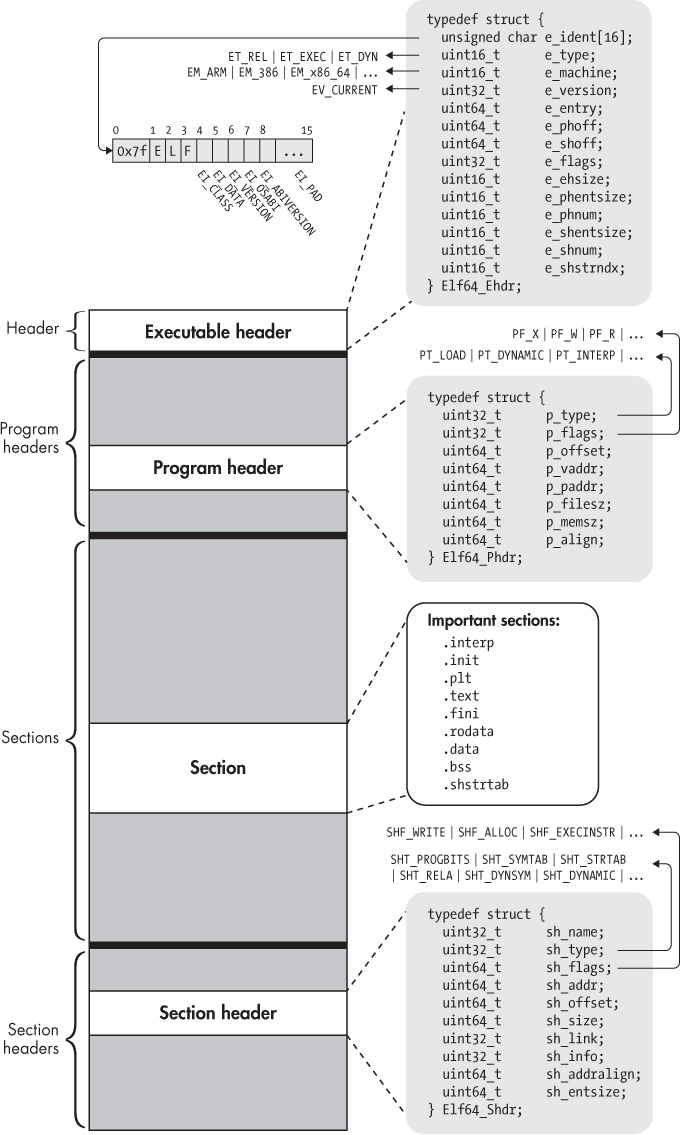
An ELF binary is composed of numerous parts and various structures, but they can generally be broken down into the following four components:
- Executable header
- Program headers (optional)
- Sections
- Section headers (optional)
The executable header comes first and determines the structure of the ELF file and any metadata regarding the machine it’s supposed to be compatible with (including endianness, word size, ABI information, etc). It also contains file offsets to the location of the section headers and program headers, among other things
The section and program headers describe sections and segments, respectively. I’ll explain the difference between these two shortly. But it is important to understand that their offsets aren’t guaranteed to be at any specific location in an ELF file, you can only know where they are by reading the respective file offset in the executable header
While this is true for the section headers, the program header table often comes right after the executable header. With a 64-bit ELF binary, this is the offset of 64 bytes into the file
The section and program headers contain metadata for sections and segments, respectively. Including their permissions, type, base addresses and file offsets (if applicable). Let’s look at each one of these in greater detail.
Executable Header
The executable header is the only portion of an ELF binary that is guaranteed by the standard to be at a specific place: the start. The header is described by the Elf64_Ehdr or Elf32_Ehdr structures, for 64-bit and 32-bit respectively. The size of this structure is 64 bytes for the 64-bit version, and 52 bytes for the 32-bit version
1
2
3
4
5
6
7
8
9
10
11
12
13
14
15
16
17
18
#define EI_NIDENT 16

typedef struct {
    unsigned char e_ident[EI_NIDENT];
    uint16_t      e_type;
    uint16_t      e_machine;
    uint32_t      e_version;
    ElfN_Addr     e_entry;
    ElfN_Off      e_phoff;
    ElfN_Off      e_shoff;
    uint32_t      e_flags;
    uint16_t      e_ehsize;
    uint16_t      e_phentsize;
    uint16_t      e_phnum;
    uint16_t      e_shentsize;
    uint16_t      e_shnum;
    uint16_t      e_shstrndx;
} ElfN_Ehdr;
Lets dive deeper into what each of these fields represent
e_ident
The e_ident field is a 16 byte array at the start of the executable header that contains important identifying information about the system and the ELF format
Magic Bytes
The first 4 bytes of every elf header is the same. It begins with the characters \7fELF to identify the file as ELF
EI_CLASS
This byte denotes whether the ELF binary is 64-bit or 32-bit. It will be set to ELFCLASS64 (or 2), or ELFCLASS32 (or 1).
EI_DATA
This byte determines the endianness. It is set to ELFDATA2LSB (1) or ELFDATA2MSB (2) for little or bit endian, respectively
EI_VERSION
This byte specifies the ELF format version. This is currently always set to EV_CURRENT (1).
EI_OSABI and EI_ABIVERSION
These two bytes specify the ABI and any version information associated with it. In most cases, these fields will be set to 0 to indicate that standard Unix System-V ABI
EI_PAD (8)
The final 8 bytes are padding and are currently unused
e_type
This 2-byte field specifies the type of the ELF binary. Common values you’ll see here are ET_REL (1), for relocatable object files, ET_EXEC (2) for executable files, ET_DYN (3) for shared object files or dynamic libraries, and ET_CORE (4) for core files.
Compilers like gcc enable PIE by default, so executable files will have type ET_DYN rather than ET_EXEC, unless you explicitly disable PIE through a compiler flag
e_machine
This 2-byte field represents the machine information. For AMD64, this will be set to EM_X86_64 (0x3E).
e_version
This 4-byte field is currently always set to EV_CURRENT(1)
e_entry
This is the virtual address specifying the entry point of the binary. This is the address that the dynamic linker will jump to after the necessary components of the file have been loaded into memory. This field is the same length as the architecture’s address size
e_phoff
This is the file offset in bytes of the start of the program header table, which is where the program headers live. This field is the same size as the architecture’s address size
e_shoff
This is the file offset in bytes of the start of the section header table, where the section headers live. This field is the same size as the architecture’s address size.
e_flags
This 4-byte field holds architecture specific flags. On x86, these are zero
e_ehsize
This 2-byte field holds the size of the executable header, which is either 64 or 52 bytes depending on the type.
e_phentsize
This 2-byte field stores the size of a program header, which is 56 bytes (64-bit) or 32 bytes (32-bit)
e_phnum
This 2-byte field stores the number of program headers in the program header table
e_shentsize
This 2-byte field stores the size of a section header, which is 64 bytes (64-bit) or 40 bytes (32-bit)
e_shnum
This 2-byte field stores the number of section headers in the file
e_shstrndx
This 2-byte field, which I pronounce as the “shister index”, holds an index into the section header table (which begins at e_shoff) to get to the section header for a specific section called the shstrtab (shister tab). This section holds a string table for the section header names. All section headers, including the one for the shstrtab itself, stores an index into the shstrtab table which stores the string representation for its section name, such as .text, .bss, etc.
Remember, assuming each section header is 64 bytes, in order to get the file offset for the section header entry of the
shstrtab, we need to doe_shoff + (e_shstrndx * e_shentsize)
Section Header Table
The section header table is a component of ELF binaries that holds what are known as section headers. Section headers are structures that hold metadata about the sections they refer to. Depending on the address size, they are either of type Elf32_Shdr or Elf64_Shdr, of size 40 or 64 bytes respectively.
1
2
3
4
5
6
7
8
9
10
11
12
13
14
15
16
17
18
19
20
21
22
23
24
25
26
27


    typedef struct {
        uint32_t   sh_name;
        uint32_t   sh_type;
        uint32_t   sh_flags;
        Elf32_Addr sh_addr;
        Elf32_Off  sh_offset;
        uint32_t   sh_size;
        uint32_t   sh_link;
        uint32_t   sh_info;
        uint32_t   sh_addralign;
        uint32_t   sh_entsize;
    } Elf32_Shdr;

    typedef struct {
        uint32_t   sh_name;
        uint32_t   sh_type;
        uint64_t   sh_flags;
        Elf64_Addr sh_addr;
        Elf64_Off  sh_offset;
        uint64_t   sh_size;
        uint32_t   sh_link;
        uint32_t   sh_info;
        uint64_t   sh_addralign;
        uint64_t   sh_entsize;
    } Elf64_Shdr;
It’s important to know that the division of the binary into sections is entirely irrelevant for executing a binary. A stripped binary will remove all section headers. The purpose of sections are really only to provide a clear view for the programmer and for the linker to perform relocations. Once the executable has been linked, the section header table is unnecessary.
Lets take a closer look at some of the fields in a section header (also known as a section header table entry)
sh_name
This 2-byte field is an offset into the shstrtab, the section header string table, which holds the string representation of the name of the section
sh_type
This 2-byte field represents the type of the section. A full list of types can be found in the ELF spec but some common ones you might see here are SHT_PROGBITS, which specify that the section contains program data (machine instructions or constants), SHT_SYMTAB and SHT_STRTAB, and their dynamic equivalents SHT_DYNSYM and SHT_DYNSTR, which hold the symbol and associated string table for both static and dynamic symbols, SHT_DYNAMIC for the .dynamic section needed for dynamic linking (more on this later), or SHT_REL and SHT_RELA tables for holding relocation entries.
Only the static symbol tables
.symtaband.strtabare removed when a binary is stripped, not the dynamic ones.dynsymanddynstr, because those symbols are needed to perform relocations
sh_flags
This field specifies the section flags, describing additional information about the data stored in a section. Some important flags are SHF_WRITE, indicating the section is writeable, SHF_ALLOC, indicating that the section should be loaded into memory during execution, and SHF_EXECINSTR, indicating the section holds executable machine code
sh_addr, sh_offset, and sh_size
These fields hold the virtual address, file offset in bytes, and size of the section in bytes
sh_link
This field holds the SHT index of a “related” section. For instance, an SHT_SYMTAB, SHT_DYNSYM, or SHT_DYNAMIC section has an associated string table, and so do relocation sections
sh_info
Some sections have additional information that need to be stored. For relocation sections, we need to know which section the relocations are to be applied, so for those sections, this field holds the index in the SHT to the section where the relocation occurs
sh_addralign
For efficiency purposes, some sections need to be aligned on a 8 or 16 byte boundary. This field will hold the alignment requirements (16 if it needs to be aligned on a 16 byte boundary), or 0 or 1 if there are no special alignment needs
sh_entsize
In most cases, sections themselves don’t have any strict layout. However in certain cases they contain tables of well-defined data structures, like symbol tables or relocation tables. This field will store the entry size of an entry in said table if the section requires it, otherwise this field is set to 0.
Sections
In the previous part, we described the section headers, which are entries in a table known as the section header table. Each section header describes a section in the binary, including its file offset and other metadata about that section. Every section in an ELF binary has an associated section header. That is to say, the number of entries in the section header table specifies the number of sections a binary has. In this part, I’ll go over some common sections you may find in ELF binaries on Linux compiled with gcc.
Note: The names of sections are entirely up to the compiler. In previous versions of gcc, some sections such as
.init_arrayand.fini_arrayused to by called.ctorsand.dtors
.init and .fini
Both of these sections contain executable code. The system will execute the code in .init before transferring control to the entry point, and it will call .fini after the main program completes.
.text
This section contains the main program code. Further, gcc will include numerous standard initialization and destruction functions such as _start and frame_dummy here.
_start is the entry-point address in the binary, which transfers control to __libc_start_main to initialize libc, before finally transferring to the user-defined main function.
.bss
This section holds uninitialized global data, however it occupies no space in the binary as its type is SHT_NOBITS. This means that its space is only allocated when the program is loaded into main memory (as zeros), but doesn’t hold any data in the on-disk ELF file
.data and .rodata
Stores initialized global variables and read-only data, respectively. Both need to occupy space in the file itself.
.plt, .got, and .got.plt
When a binary is loaded into a process, it need to know where its dynamic symbols are located. The Linux dynamic loader (ld-linux) by default performs lazy binding, or waiting until the first reference to a dynamic symbol occurs before resolving them. Lazy binding will be explained in detail in another part, but the basic idea of it involves the usage of these sections
The PLT (Procedure Linkage Table) is an executable section of code that holds stubs for dynamic library function calls. These stubs will index into the GOT (the Global Offset Table) to retrieve a function address that will eventually be filled in by the dynamic linker with the true function address of the external library call. The function addresses used by the PLT stubs, often called “jump slots” in the GOT are located in the .got.plt section, which is a subsection of the GOT, while the .got section in general holds references to data items that don’t need to go through the PLT.
.rel.* and .rela.*
Sections with this prefix hold relocation entries of the following format:
1
2
3
4
5
6
7
8
9
10
11
12
13
14
15
16
17
18
19
20
21
22
23
typedef struct {
    Elf32_Addr r_offset;
    uint32_t   r_info;
} Elf32_Rel;

typedef struct {
    Elf64_Addr r_offset;
    uint64_t   r_info;
} Elf64_Rel;

//Relocation structures that need an addend:
typedef struct {
    Elf32_Addr r_offset;
    uint32_t   r_info;
    int32_t    r_addend;
} Elf32_Rela;

typedef struct {
    Elf64_Addr r_offset;
    uint64_t   r_info;
    int64_t    r_addend;
} Elf64_Rela;
In general, a relocation entry will hold a virtual address where the relocation is to be applied (or a file offset for relocatable objects), and a packed field r_info specifying type info, among other things. Two specific types of relocation entries you might see include:
- R_X86_64_JUMP_SLO: A “jump slot” in the GOT (the
.got.pltto be exact) - R_X86_64_GLOB_DAT: Global data relocation entry, has its offset in the
.gotsection
.dynamic
This section contains entries of type Elf32_Dyn or Elf64_Dyn.
1
2
3
4
5
6
7
8
9
10
11
12
13
14
15
16
17
typedef struct {
    Elf32_Sword    d_tag;
    union {
        Elf32_Word d_val;
        Elf32_Addr d_ptr;
    } d_un;
} Elf32_Dyn;
extern Elf32_Dyn _DYNAMIC[];

typedef struct {
    Elf64_Sxword    d_tag;
    union {
        Elf64_Xword d_val;
        Elf64_Addr  d_ptr;
    } d_un;
} Elf64_Dyn;
extern Elf64_Dyn _DYNAMIC[];
Each entry holds relevant dynamic linking information. Most importantly, it holds a tag in the d_tag member. The d_un union stores the associated value for that tag, which can either be a pointer or a raw value, depending on the tag type.
Some common tags include DT_NEEDED, which indicates a shared library address that is a dependency of the executable. The .dynamic section also holds pointers to other important structures needed for dynamic linking such as the dynamic string tables (DT_STRTAB, DT_SYMTAB), dynamic relocation sections (DT_RELA) and the .got.plt section (DT_PLTGOT). The dynamic linker therefore uses the contents of this section to act as a “roadmap” for accessing things it needs.
.init_array and .fini_array
These sections contain arrays of function pointers to use as global constructors or destructors, respectively. This can be used to perform user-defined global initialization and cleanup before and after the main program code. These can be accessed in gcc using __attribute__((constructor)) or __attribute__((destructor)). Here is an example using C++ syntax
1
2
3
4
5
6
7
8
9
10
11
12
13
#include <cstdio>
#include <iostream>

[[gnu::constructor]]
void ctor()
{
    // We can't use std::cout here because it hasn't been initialized/constructed yet
    printf("Testing...");
}
int main()
{
    std::cout << "Hello world!" << std::endl;
}
You can define as many constructors or destructors as you’d like
.shstrtab, .symtab, .strtab, .dynsym, .dynstr
These sections hold static and dynamic symbol and string tables. The symbol tables hold symbolic information and metadata about a particular symbol used in the binary. Each symbol table holds a link to an associated string table, which holds null-terminated character sequences specifying the name of the symbol. The layout for a symbol table looks like this.
1
2
3
4
5
6
7
8
9
10
11
12
13
14
15
16
17
typedef struct {
    uint32_t      st_name;
    Elf32_Addr    st_value;
    uint32_t      st_size;
    unsigned char st_info;
    unsigned char st_other;
    uint16_t      st_shndx;
} Elf32_Sym;

typedef struct {
    uint32_t      st_name;
    unsigned char st_info;
    unsigned char st_other;
    uint16_t      st_shndx;
    Elf64_Addr    st_value;
    uint64_t      st_size;
} Elf64_Sym;
The members of this struct hold metadata associated with the symbol it references including the name, value, its type and binding structures, visibility, and SHT index of the section it’s defined in relation to.
Program Header Table
The program header table often appears directly after the executable header in an ELF binary. Previously, I stated that the section headers are irrelevant when an executable is run and only holds information that is necessary at link-time. The program header is different, it defines the concept of a segment. A segment in relation to a program header is what a section is in relation to a section header
Perhaps the reason they didn’t call it a “segment” header is likely to prevent confusion between that an a section header, and also the naming convention used for segment header fields is prefixed with an “sh”, which would also be the case had they chosen to go with segment header instead of program header. Calling it program header means they can now use the prefix “ph” for the fields and it wouldn’t cause confusion.
A section is useful for static linking purposes only, but a segment is used by the OS and the dynamic linker when loading an ELF into a process for execution. A segment combines zero or more sections into one large chunk that the dynamic linker can access and determine whether or not it should load it into memory. Each segment is described by a program header, located in the Program Header Table (at offset e_phoff bytes in the file). The structure of a program header is as follows
1
2
3
4
5
6
7
8
9
10
11
12
13
14
15
16
17
18
19
20
21
typedef struct {
    uint32_t   p_type;
    Elf32_Off  p_offset;
    Elf32_Addr p_vaddr;
    Elf32_Addr p_paddr;
    uint32_t   p_filesz;
    uint32_t   p_memsz;
    uint32_t   p_flags;
    uint32_t   p_align;
} Elf32_Phdr;

typedef struct {
    uint32_t   p_type;
    uint32_t   p_flags;
    Elf64_Off  p_offset;
    Elf64_Addr p_vaddr;
    Elf64_Addr p_paddr;
    uint64_t   p_filesz;
    uint64_t   p_memsz;
    uint64_t   p_align;
} Elf64_Phdr;
I’ll describe each field in this structure in detail.
p_type
This 4-byte field describes the type of the segment. Since segments are composed of multiple sections, this can also be interpreted as the collective type of all the sections that make up the segment. Common types include:
PT_LOAD: Describes a segment to be loaded into memory. Analogous toSHT_ALLOCfor individual sectionsPT_DYNAMIC: Contains the.dynamicsection in its entiretyPT_INTERP: Contains the.interpsection, which holds the string name of the interpreter/dynamic linker used to load the binary.
Using readelf can give you a clear picture of all the program headers and the associated section to segment mappings
1
2
3
4
5
6
7
8
9
10
11
12
13
14
15
16
17
18
19
20
21
22
23
24
25
26
27
28
29
30
31
32
33
34
35
36
37
Elf file type is DYN (Shared object file)
Entry point 0x10e0
There are 13 program headers, starting at offset 64

Program Headers:
  Type           Offset   VirtAddr           PhysAddr           FileSiz  MemSiz   Flg Align
  PHDR           0x000040 0x0000000000000040 0x0000000000000040 0x0002d8 0x0002d8 R   0x8
  INTERP         0x000318 0x0000000000000318 0x0000000000000318 0x00001c 0x00001c R   0x1
      [Requesting program interpreter: /lib64/ld-linux-x86-64.so.2]
  LOAD           0x000000 0x0000000000000000 0x0000000000000000 0x000890 0x000890 R   0x1000
  LOAD           0x001000 0x0000000000001000 0x0000000000001000 0x000315 0x000315 R E 0x1000
  LOAD           0x002000 0x0000000000002000 0x0000000000002000 0x0001e0 0x0001e0 R   0x1000
  LOAD           0x002d68 0x0000000000003d68 0x0000000000003d68 0x0002a8 0x0003f0 RW  0x1000
  DYNAMIC        0x002d88 0x0000000000003d88 0x0000000000003d88 0x000200 0x000200 RW  0x8
  NOTE           0x000338 0x0000000000000338 0x0000000000000338 0x000020 0x000020 R   0x8
  NOTE           0x000358 0x0000000000000358 0x0000000000000358 0x000044 0x000044 R   0x4
  GNU_PROPERTY   0x000338 0x0000000000000338 0x0000000000000338 0x000020 0x000020 R   0x8
  GNU_EH_FRAME   0x00201c 0x000000000000201c 0x000000000000201c 0x00005c 0x00005c R   0x4
  GNU_STACK      0x000000 0x0000000000000000 0x0000000000000000 0x000000 0x000000 RW  0x10
  GNU_RELRO      0x002d68 0x0000000000003d68 0x0000000000003d68 0x000298 0x000298 R   0x1

 Section to Segment mapping:
  Segment Sections...
   00
   01     .interp
   02     .interp .note.gnu.property .note.gnu.build-id .note.ABI-tag .gnu.hash .dynsym .dynstr .gnu.version .gnu.version_r .rela.dyn .rela.plt
   03     .init .plt .plt.got .plt.sec .text .fini
   04     .rodata .eh_frame_hdr .eh_frame
   05     .init_array .fini_array .dynamic .got .data .bss
   06     .dynamic
   07     .note.gnu.property
   08     .note.gnu.build-id .note.ABI-tag
   09     .note.gnu.property
   10     .eh_frame_hdr
   11
   12     .init_array .fini_array .dynamic .got
p_flags
This 4-byte field describes the runtime permissions of the segment, which can be any of PF_R, PF_W, and PF_X representing read, write, and executable permissions. There are analogous to the associated sh_flags set in the sections that comprise the segment.
p_offset, p_vaddr and p_paddr
p_offset represents the file offset at which the segment starts, analogous to sh_offset for a single section. p_vaddr represents the virtual address where the segment is to be loaded, analogous to sh_addr. p_paddr is usually zero in modern systems that use virtual memory. For loadable segments, p_vaddr must be equal to p_voffset % page_size.
p_filesz and p_memsz
These specify the size of the segment in the file verses its size when loaded into memory. The reason these two can be different is because certain segments don’t occupy any space on the file, but they need to be allocated when the binary is loaded into a new process. An example of this would be the .bss section, which contains zero-initialized data
p_align
Specifies the alignment requirement of the segment, analogous to sh_addralign. A value of 0 or 1 indicates no alignment is necessary, otherwise it’s value must be a power of 2 and p_vaddr == p_offset % p_align.
And that’s it for the basics of the ELF format. In Part 2 of this series, I’ll explain how this all ties together with the dynamic loader and how concepts such as lazy binding are implemented in more detail.