Practical Binary Analysis Ch. 5 CTF: Lvl 7
Welcome to my writeup to capture the Level 7 flag in the CTF challenge in Practical Binary Analysis. This flag was one of the most difficult ones to retrieve, but it was also the most rewarding.
Upon entering the lvl6 flag into the oracle, we retrieve the lvl7 binary. It appears to be a gzip compressed archive. Inside it, we see two files: stage1 and stage2.zip. The zip file is password protected, so it looks like we’ll have to split this flag-hunting session into two stages: one to find the password and the other to find the flag
Running the lvl6 flag in the oracle provides the following hint

So it appears we’ll have to do some dynamic analysis to get this flag
Stage 1: Find the Key
The stage1 binary is a normal ELF executable that, when executed, seems to do nothing. Neither ltrace not strace seem to produce anything of significance. Boring. Lets see if we can find any useful strings
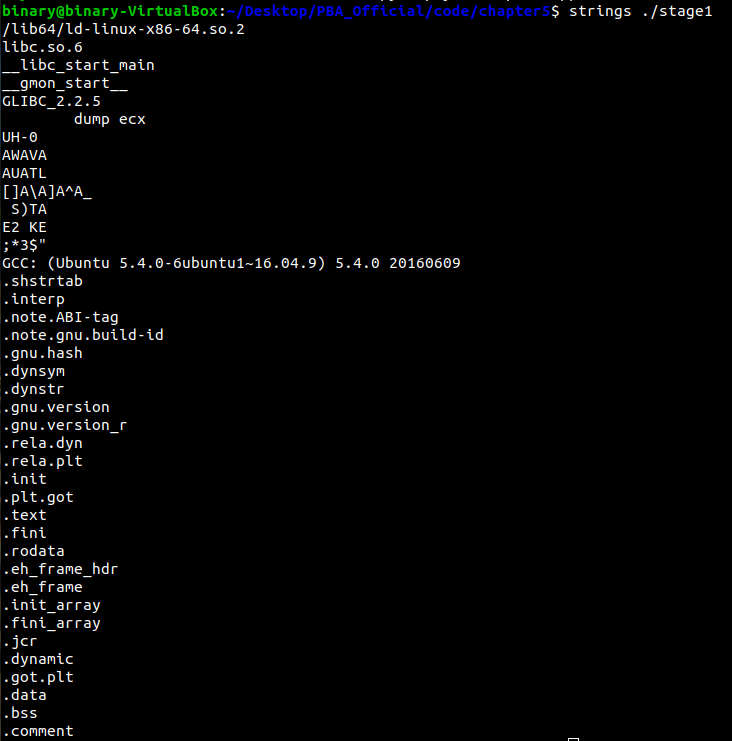
Blink and you might miss it. There’s a peculiar string in the output that says dump ecx, which seems like an obvious hint. But where is it located? It turns out that it’s actually encoded as data inside an executable region: the .text section
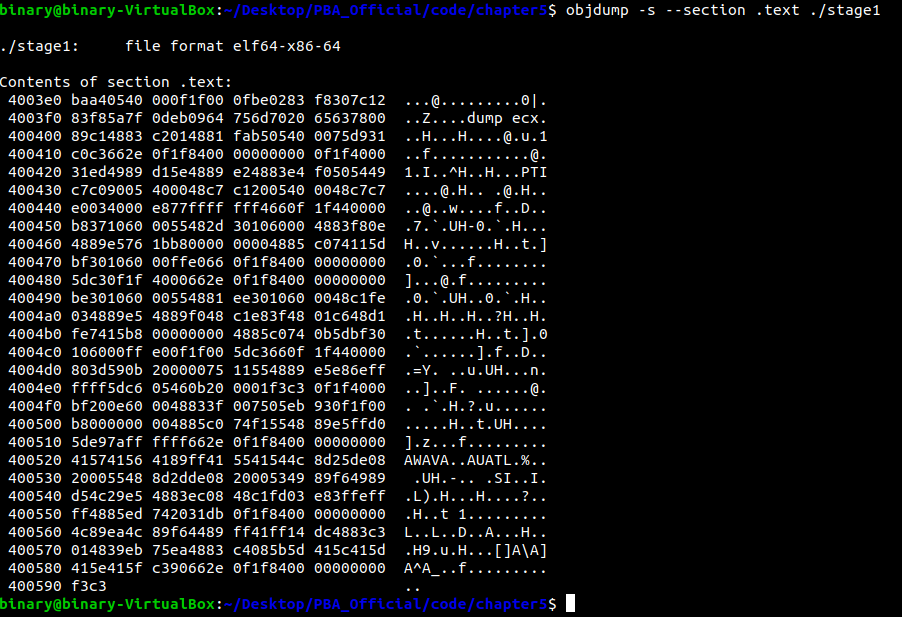
This seems similar to Level 6 where our flag was encoded directly as data in an executable region. Lets see the instructions surrounding this data and figure out where we poke into with our debugger. From objdump, it appears that the 0x4003f7 is where the data is inserted into our code region, leading to garbage disassembly output in that area
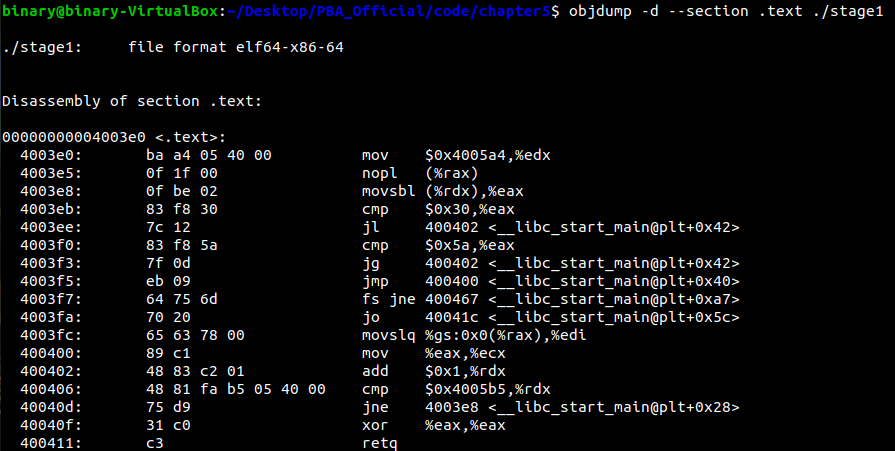
The hint says to dump the value of ecx, and it appears that register is loaded directly after the garbage data, so lets set a breakpoint in gdb directly after the value gets loaded into ecx at address 0x400402. Lets do what it says and print out the value of ecx. We’ll use the following breakpoint in gdb to do this:
1
2
3
4
5
6
b *(0x400402)
commands
    silent
    p/c $rcx
    continue
end
This will print the value of eax along with its ASCII representation if it means anything on every hit. Running the program, we get the following output:
1
2
3
4
5
6
7
8
9
10
11
12
13
14
15
16
17
18
19
20
21
22
23
24
25
26
27
28
29
30
(gdb) b *(0x400402)
Breakpoint 1 at 0x400402
(gdb) commands
Type commands for breakpoint(s) 1, one per line.
End with a line saying just "end".
>silent
>p/c $rcx
>continue
>end
(gdb) run
Starting program: /home/binary/Desktop/PBA_Official/code/chapter5/stage1
$1 = 0 '\000'
$2 = 83 'S'
$3 = 83 'S'
$4 = 84 'T'
$5 = 65 'A'
$6 = 65 'A'
$7 = 71 'G'
$8 = 71 'G'
$9 = 71 'G'
$10 = 71 'G'
$11 = 69 'E'
$12 = 50 '2'
$13 = 50 '2'
$14 = 75 'K'
$15 = 69 'E'
$16 = 69 'E'
$17 = 89 'Y'
[Inferior 1 (process 10781) exited normally]
(gdb)
It appears that the strings that is being spelled out, ignoring the duplicates, is stage2.zip is successful.
To be perfectly honest, I discovered the password a lot earlier during my attempt to find the dump ecx string in the binary. I simply dumped .rodata and discovered this:

It appears the authors of this challenge made it slightly more difficult to realize that this spells out the password for the second stage, but it’s still pretty easy to see.
Stage 2: Capture the Flag
One we use the password stage2.zip file, we find two files in the archive: tmp and stage2, both of which are executable ELF binaries. Running a diff on these files indicates that they are identical, so I’m not entirely sure why there are two identical files included in the archive.
Running either binary produces the following
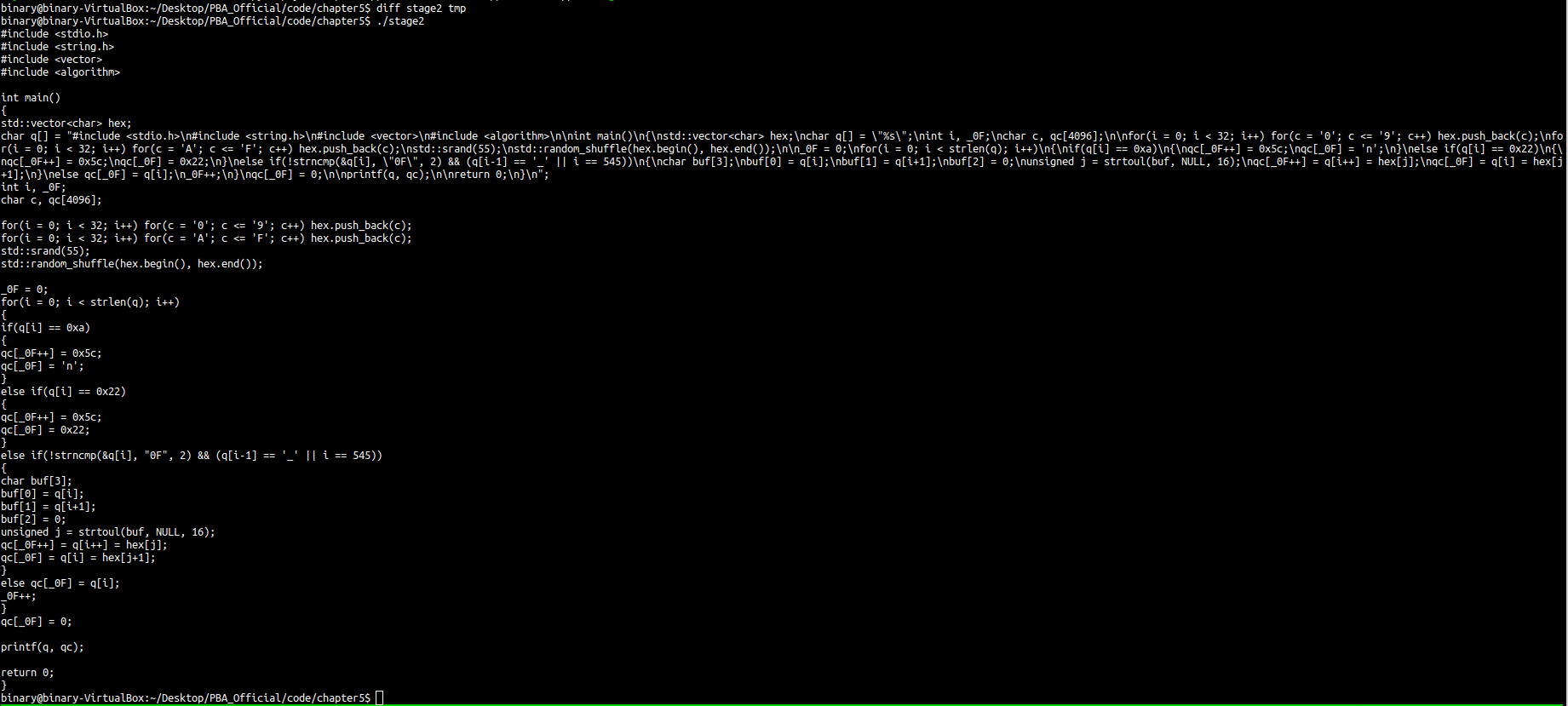
It appears that the binary outputs a C++ source file to stdout. What would happen if we saved and compiled this source file? Let’s find out:
1
2
3
4
5
6
7
8
9
10
11
12
13
14
15
16
17
18
19
20
21
22
23
24
25
26
27
28
29
30
31
32
33
34
35
36
37
38
39
40
41
42
43
44
45
46
47
48
49
50
51
52
53
54
binary@binary-VirtualBox:~/Desktop/PBA_Official/code/chapter5$ g++ random.cpp -o new.out
binary@binary-VirtualBox:~/Desktop/PBA_Official/code/chapter5$ ./new.out
#include <stdio.h>
#include <string.h>
#include <vector>
#include <algorithm>

int main()
{
std::vector<char> hex;
char q[] = "#include <stdio.h>\n#include <string.h>\n#include <vector>\n#include <algorithm>\n\nint main()\n{\nstd::vector<char> hex;\nchar q[] = \"%s\";\nint i, _25;\nchar c, qc[4096];\n\nfor(i = 0; i < 32; i++) for(c = '0'; c <= '9'; c++) hex.push_back(c);\nfo
r(i = 0; i < 32; i++) for(c = 'A'; c <= 'F'; c++) hex.push_back(c);\nstd::srand(55);\nstd::random_shuffle(hex.begin(), hex.end());\n\n_25 = 0;\nfor(i = 0; i < strlen(q); i++)\n{\nif(q[i] == 0xa)\n{\nqc[_25++] = 0x5c;\nqc[_25] = 'n';\n}\nelse if(q[i] == 0x22)\n{\
nqc[_25++] = 0x5c;\nqc[_25] = 0x22;\n}\nelse if(!strncmp(&q[i], \"25\", 2) && (q[i-1] == '_' || i == 545))\n{\nchar buf[3];\nbuf[0] = q[i];\nbuf[1] = q[i+1];\nbuf[2] = 0;\nunsigned j = strtoul(buf, NULL, 16);\nqc[_25++] = q[i++] = hex[j];\nqc[_25] = q[i] = hex[j
+1];\n}\nelse qc[_25] = q[i];\n_25++;\n}\nqc[_25] = 0;\n\nprintf(q, qc);\n\nreturn 0;\n}\n";
int i, _25;
char c, qc[4096];

for(i = 0; i < 32; i++) for(c = '0'; c <= '9'; c++) hex.push_back(c);
for(i = 0; i < 32; i++) for(c = 'A'; c <= 'F'; c++) hex.push_back(c);
std::srand(55);
std::random_shuffle(hex.begin(), hex.end());

_25 = 0;
for(i = 0; i < strlen(q); i++)
{
if(q[i] == 0xa)
{
qc[_25++] = 0x5c;
qc[_25] = 'n';
}
else if(q[i] == 0x22)
{
qc[_25++] = 0x5c;
qc[_25] = 0x22;
}
else if(!strncmp(&q[i], "25", 2) && (q[i-1] == '_' || i == 545))
{
char buf[3];
buf[0] = q[i];
buf[1] = q[i+1];
buf[2] = 0;
unsigned j = strtoul(buf, NULL, 16);
qc[_25++] = q[i++] = hex[j];
qc[_25] = q[i] = hex[j+1];
}
else qc[_25] = q[i];
_25++;
}
qc[_25] = 0;

printf(q, qc);

return 0;
}
It looks like it produces a binary that outputs another C++ source file to stdout! From examining the two source files, they appear nearly identical except for a single variable:
1
2
int i, _0F; // file 2
int i, _25; // file 2
It appears that these could be bytes of our flag. It looks like we’ll have to recursively compile these generated source files and find this variable to construct our flag. Because of the recursive nature of this, I call this “peeling the onion”.
But having to painstakingly do this numerous times to get our flag sounds extremely boring, and I don’t have the patience for it, so let’s write a Python script that will automate peeling the onion:
1
2
3
4
5
6
7
8
9
10
11
12
13
14
15
16
17
18
19
20
21
22
import subprocess
import re
def peel(cmd):
    out = subprocess.check_output(cmd, shell=True);
    decoded = out.decode('utf-8');
    with open("peel.cpp","w") as f:
        f.write(decoded);

    x = re.search(r"int i, _(..);", decoded)
    if x is not None:
            print(x.group(1))
    else:
        print("X is none!")

if __name__ == "__main__":
    print("Peeling the onion!")
    peel("./tmp") # initial file
    try:
        while True:
            peel("g++ peel.cpp -o layer; ./layer")
    except:
        print("Exception received. Terminating...")
This script will compile the program and save it’s output into a staging source file peel.cpp which will contain the code in every layer until we have our flag. Running the script, we see the following output
1
2
3
4
5
6
7
8
9
10
11
12
13
14
15
16
17
18
19
20
21
22
23
24
25
26
27
28
29
30
31
32
33
34
35
36
37
38
39
40
41
42
43
44
45
binary@binary-VirtualBox:~/Desktop/PBA_Official/code/chapter5$ python3 onion.py
Peeling the onion!
0F
25
E5
12
A7
76
3E
EF
B7
69
6B
3A
ED
A1
F9
64
70
3E
EF
B7
69
6B
3A
ED
A1
F9
64
70
3E
EF
B7
69
6B
3A
ED
A1
F9
64
70
3E
^CException received. Terminating...
binary@binary-VirtualBox:~/Desktop/PBA_Official/code/chapter5$
It appears the layers keep going infinitely and the program never terminates. However, examining the output, we can see that after 70 is printed, we get 10 additional unique bytes and then it repeats that sequence forever. Let’s just try concatenating the first 16 bytes and using it as our flag

And it works! The final flag for this level is