Practical Binary Analysis Ch. 5 CTF: Lvl 1 and Lvl 2
A few weeks ago, I began reading Practical Binary Analysis by Dennis Andriesse. This book has a plethora of information about low level binary analysis and instrumentation. It is mainly written from the perspective of a Linux user, but the book briefly touches on other operating systems and file formats as well, including the structure of PE files on Windows.
The author provides a virtual machine along with the example code for every chapter in this book, and Chapter 5 walks us through a CTF challenge where we are provided a mystery file called “payload” and our goal is to extract the flag after analyzing it. The author provides a step-by-step walkthrough of how to get the initial flag, and at the end of the chapter we are given an extended CTF exercise with multiple levels in the book’s VM that can be unlocked with the initial flag that we find in Chapter 5. This post, and the series of posts that will come after, will describe how to get the flag for each level. But first, for the sake of thoroughness, I’ll briefly walk through the steps the author explained on how to get the initial Chapter 5 flag.
As likely intended by the author, these solutions will not be using any advanced static analysis tools like IDA Pro or Ghidra, and will mainly only rely on simple tools such as gdb, readelf, nm, ltrace and strace, objdump, and a hex editor of choice.
Initial Flag: lvl1
The initial flag the author derives in Chapter 5 is

The payload file appears to be base64 encoded. Decoding this reveals a gzip compressed archive containing a tarball. When we extract what’s inside, we have a file called ctf, an ELF executable, and 67b8601, what appears to be a bitmap image.
Running the ctf binary gives us a dependency error attempting to load a shared library called lib5ae9b7f.so, which doesn’t seem like a standard shared library.

However, if we run grep -r ELF to see if there are any hidden files in what we are given, we note that there is hidden ELF header in the strange bitmap file:

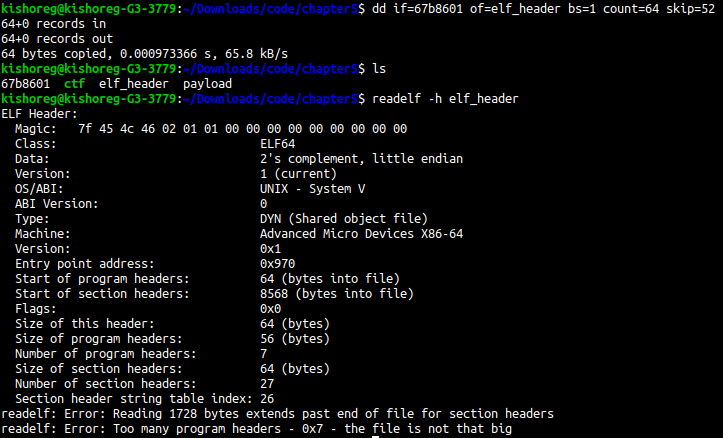
A hex editor reveals that the ELF header begins at offset 52. We can extract the 64 byte executable header using the following command:
1
dd if=67b8601 of=header bs=1 count=64 skip=52
Examining the header with readelf, we see that the section header table occurs at offset 8568, and there are 27 section headers of size 64 bytes each
From what we know about ELF binaries (a full writeup on the ELF binary format is in progress), the section header table is the last part of the binary. So this offset can be used to calculate the total size of the file. After calculating it, we can use dd again to extract the full file into a file called lib5ae9b7f.so and run the ctf binary again to fix the dependency issue. Then, we add the current directory to the environment variable LD_LIBRARY_PATH to instruct the dynamic linker to search the current directory as well for shared libraries
Running strings on the ctf binary reveals there is an interesting string called show_me_the_flag next to what appears to be a format string referencing command line args. So let’s pass show_me_the_flag as a command line arg to ctf.
Next, we can run ltrace -i -C ./ctf show_me_the_flag to trace the library calls made by the binary, demangle C++ function names and print the instruction pointer address, which reveals an environment variable GUESSME being queried:

Setting this environment variable reveals a puts call with the string “guess again”, which appears to be a fail case. Using the address of that puts call in the ltrace output, we use objdump to disassemble the instructions surrounding it
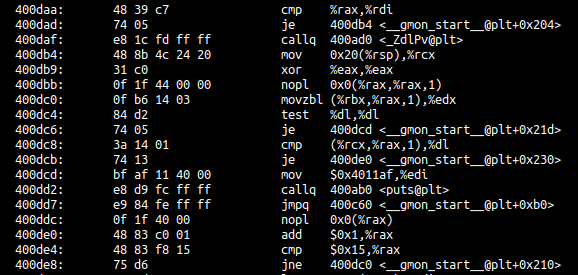
From analysis, it would appear that register rcx stores the ground truth and each byte of this string is compared against the input value in GUESSME, so we can attach to the puts call’s address in gdb to dynamically find the correct value for GUESSME, which ends up being "Crackers Don't Matter". Setting GUESSME to this value and passing show_me_the_flag as a command line argument to ctf as before reveals the aforementioned flag.
Given that the author already provides an explanation on how to get this flag, I only briefly covered it here. For a more detailed analysis, consult Practical Binary Analysis, chapter 5 for a complete step-by-step walkthrough.
Second Flag: lvl2
In the exercise at the end of the chapter, we are instructed to pass the previous flag to the oracle program provided in the code files or VM on the website to unlock a new CTF challenge. When we pass the flag to the oracle program, we see that it unlocks the lvl2 binary, and provides us the following hint.

Running the lvl2 binary gives us a strange hexadecimal byte printed out to stdout. What’s stranger is that it appears to change at regular intervals. To confirm this, we can run the command watch -n 1 ./lvl2, which shows the output changing at a regular interval every second. This is indicative that the program is using pseudorandom number generation and seeding with the system time. To confirm this, lets run ltrace on our lvl2 binary:

As we suspected, the program make a call to time(0), srand(), and finally rand() before the puts() call which prints out our byte. In order to figure out where this byte comes from, we need to introspect this code further. Lets use objdump and see what happens near that puts() call.
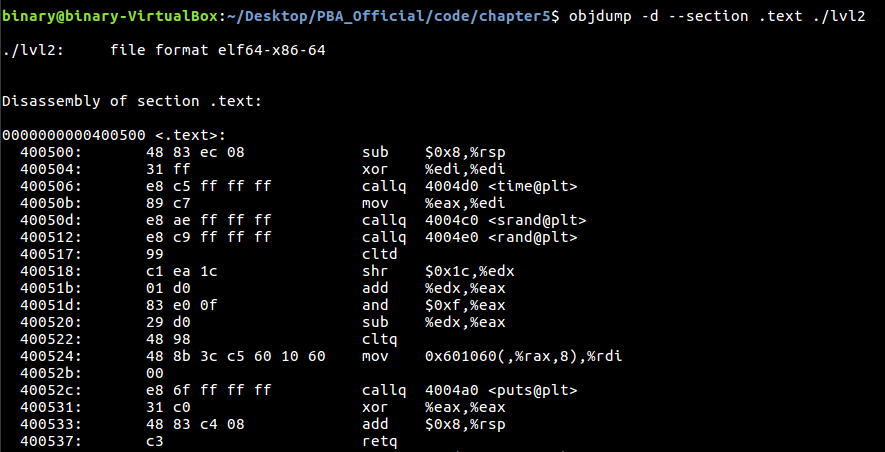
Luckily for us, the code we need to examine is right at the start of the .text section and we don’t need to dig very far at all. The puts() call is at address 0x40052c, and we can see the argument it uses is an offset from the address 0x601060. After the puts() call, the value of rax is cleared with the xor instruction
For historical compatibility reasons on x86-64, any operation that occurs on the lower 32 bits of a register will be zero-extended to the upper 32 bits, so even though the operation is only on the lower dword, it will clear the entire
raxregister
rax initially stores the return value of rand(), and the lower byte of this value is masked and used as an index to the data stored at 0x601060, which appears to be an array of 8-byte values, likely C-string pointers. The compiler generates a bit-twiddling block to deal with signed results using ctld and a shr instruction, but these are irrelevant for our purposes since rand will never return a negative number.
So lets review our assumptions so far: we are assuming that the address 0x601060 is an array of string pointers that lvl2 indexes into randomly and prints out a 2 character string from. Printing out the .data section, we see the following
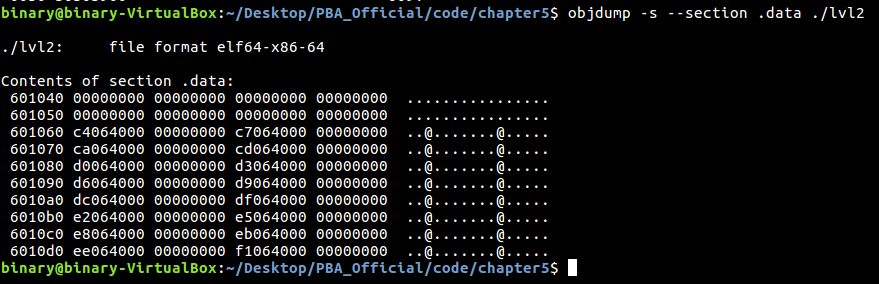
Those certainly look like pointers to me. Each pointer seems to be referencing the same memory region at increments of 3 bytes (which would account for the string representation of a hex byte which comprises of 2 character bytes and a null terminator). Accounting for the fact that we are dealing with little-endian encoded addresses, we can once again find their references in the .rodata section of the binary
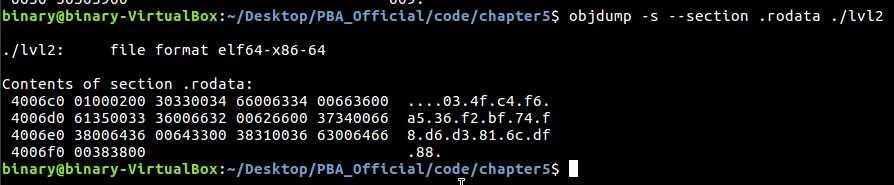
This certainly looks like like some interesting data. It is 32 characters in total, which is the same length as a flag. Maybe if we concatenate them in order as hinted by the oracle initially, we get a valid flag.

Success! The flag is